


Al Quran - Read Quran Offline
4.324.00 Reviews
App Specs
- Version
- 1.3.0
- Updated On
- License
- Free
- Downloads
- 1,000,000+
- Developer
- genie islam
- Categories
- Libraries & Demo
- Platform
- Android
Screenshots



 Analysis by AppCompare
When I judge a Quran-reading app, I look beyond whether it can display the text: I want to know whether it suits the way I read, whether it works in the moments I need it, and whether I can make comfortable choices about using it. Al Quran - Read Quran Offline is a free reading app from genie islam in the Libraries & Demo category. Its focus is straightforward: keeping Quran reading available on a phone, including when a connection is not convenient. I find that practical aim more useful than a crowded collection of extras, though the experience still depends on whether its reading tools fit your habits.
Reading comfortably, online and off
I find the best way to judge offline reading is to plan for it before the connection disappears: choose a passage while online, then check that the app is ready for the moment you need it. That small routine makes it easier to tell whether a phone-based Quran reader fits your day, and it also sets up the next question: what can I comfortably adjust once I begin reading?
First impressions and navigation
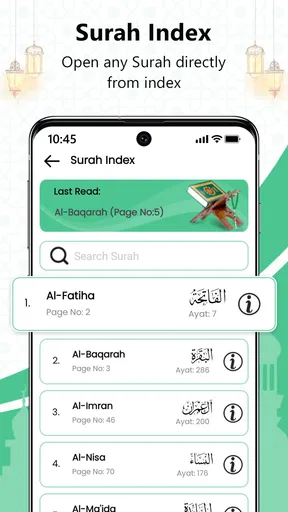
You know when you download an app and right off the bat, it just feels right? That's what happened with Al Quran - Read Quran Offline. The interface is sleek and intuitive. It's like they knew exactly what we needed for an immersive reading experience. The design is minimalistic yet rich, making navigation smooth and effortless. I was pleasantly surprised by how quickly I could find specific surahs and ayahs.
That quick access matters most when I have a particular passage in mind and do not want to spend the first few minutes working out where it is. For a first-time reader, though, I would still suggest taking a little time to learn how the app’s navigation works before relying on it for a planned reading session. A calm interface can make a tool feel approachable, but it does not replace knowing where its controls are.
Offline reading and everyday routines
One of the coolest features is the ability to read the Quran offline. Imagine having access to the entire Quran without worrying about internet connectivity. This is a game-changer for me, especially during my travels or when I'm in areas with spotty service.
The useful detail in that promise is the timing: offline access is most valuable when you prepare before leaving a reliable connection. I would open the app at home or on a stable network, confirm the text I plan to read is available, and then use it during a commute, in a waiting room, or somewhere with weak reception. That simple habit helps avoid discovering a loading problem at the exact moment I hoped to read.
For a realistic daily routine, I might read a few passages before leaving home, then return to the same reading during a lunch break without depending on public Wi-Fi. On a trip, the phone can be a convenient substitute for carrying a printed copy, especially when bag space is tight. I would still keep a printed Quran if I wanted a screen-free session or expected to read for a long stretch; offline access solves connectivity, not eye strain or battery limits.
Worth Reading Before You Choose

Baby Panda World Brings Quick Play to Modern Phones, but Its Game Library Feels Busy

ESPN’s Live Game View Makes Following Close Games Easier

QuizzLand Review: A Good Fit for Short Trivia Breaks, Not Every Player

Basketball Stars: Multiplayer Is Fast, but Can It Recover When Matches Go Wrong?

WEBTOON Turns Phone Updates Into a Better Reading Routine

Link to Windows Runs on Shared Habits, Not Social Feeds
Offline reading also changes the privacy trade-off in a practical way: once I am reading without a connection, I am not relying on a live network simply to display the text. That is a description of how I choose to use the app, not a claim about its broader data practices. I would not treat offline mode as proof of anything about collection or storage. Readers who care about that distinction should make their choices based only on settings and notices they can actually see.
Translations, study, and finding a passage
Another highlight is the translation feature. The app offers multiple translations, which is incredibly helpful for those of us who appreciate different perspectives and interpretations. The translations are precise and provide a deeper understanding of the text.
I find translations most useful as a reading aid rather than a replacement for the Arabic text or for a trusted teacher’s explanation. A translation is an interpretation expressed in another language, so comparing versions can prompt thoughtful questions without settling every question of meaning. If you are studying a sensitive or difficult passage, it is sensible to consult a knowledgeable source rather than rely on one app alone.
For a focused session, I would choose a short passage, read it once, and then compare the available translations before moving on. That is more manageable than switching back and forth constantly through a long reading. The trade-off is that multiple versions can make a quick devotional read feel slower; when I want a simple, uninterrupted rhythm, I would stay with one translation or read the Arabic without turning the session into a comparison exercise.
For those of us who love to bookmark and take notes, the app has got us covered. I can easily mark my favorite verses or jot down insights, making it super convenient to revisit them later. Plus, the search function is a lifesaver when I need to quickly locate a passage.
Bookmarks and notes can turn a reader into a personal study notebook, but I would use them deliberately. A useful approach is to bookmark passages I genuinely plan to revisit and keep notes brief: a question, a theme, or a reminder to check a meaning later. If I mark everything, the saved list becomes less helpful. Search is handy when I remember a phrase or want to return to a known passage, while browsing chapter by chapter may be better when I am trying to preserve the flow of a continuous reading.
Comfort, recitation, and practical limits
Let’s talk about the user experience. The app’s developers clearly prioritized ease of use. Whether you’re a tech newbie or a seasoned pro, navigating through the app feels like a breeze. The font is easily adjustable, which is perfect for extended reading sessions, and the night mode feature is gentle on the eyes during late-night readings.
Those options are worth setting before a longer session rather than adjusting them repeatedly while reading. I would increase the font until I can follow a line comfortably without holding the phone unusually close, then test the night appearance in the lighting where I normally read. A setting that feels easy on the eyes in a dark room may not be the one I prefer in daylight. Even with a comfortable display, a phone remains a small, lit screen, so someone who reads for hours may prefer paper or a dedicated e-reader.
One small but significant detail is the option to listen to the Quran being recited. The audio quality is superb, and having the pronunciation readily available enhances my learning. It’s like having a personal tutor guiding me through the verses.
I would treat recitation as a complement to reading, especially when working on pronunciation or wanting to listen while following the text. It is not quite the same as direct feedback from a teacher: listening can help me hear a sound or rhythm, but it cannot tell me whether I have reproduced it correctly. Audio is also less convenient in settings where headphones would be distracting or inappropriate, so silent reading remains the more flexible choice in shared spaces.
One trade-off worth remembering is that an app can combine text, sound, search, and saved material, but every extra tool can pull attention away from the passage itself. I would keep a session simple: choose whether I am reading, comparing translations, or listening, then use the other tools only when they answer a specific question. That keeps the phone from turning a quiet reading period into a sequence of taps and side tasks.
Trust, visible choices, and who should look elsewhere
For a reader deciding whether to install it, the basic scale is reassuring in a limited sense: the app has an average rating of 4.2 from around 30,000 ratings and has passed over a million installs. Those figures suggest that many people have tried it, but popularity alone cannot tell me whether its handling of information matches my expectations. I do not assume anything about permissions or data practices that I cannot verify in the app itself.
My approach is to check the permission prompts and any privacy information shown before making a choice, and to decline access that does not seem necessary for how I intend to read. I would also look for account or personalization controls if they appear, rather than assuming that every reader has the same options. The important distinction is between a choice I can see and a claim I cannot substantiate; I would not install an app on the assumption that it has a particular privacy setting.
The app is rated for Everyone, runs on Android starting with version 9, and its current version is 1.3.0. It is free to install, with optional in-app purchases listed at prices ranging from $0.99 to $4.49 per item. I would check the purchase screen before confirming anything, especially if I only want the basic reading experience. The existence of optional purchases does not by itself tell me what each item changes, so I would decide based on the actual description shown at the point of purchase.
For a reader who wants an accessible Quran on a phone, offline availability, and a mix of reading and listening, this is a reasonable app to try. It may be a poor fit for someone who wants a paper-like display, needs a particular scholarly study tool, or prefers a reader with clearly presented controls that better match their own privacy expectations. In those cases, I would compare it with a printed Quran, a dedicated e-reader, or another Quran app whose visible options meet that need. The best alternative depends on what matters most: uninterrupted reading, study depth, screen comfort, or confidence in the choices presented.
Why I would try it
If you’re on the hunt for a user-friendly and feature-rich Quran app, this one should definitely be on your radar. The offline capability alone makes it stand out, but when you add in the seamless interface and comprehensive features, it’s a no-brainer.
Plus, the app continuously updates to improve the user experience, which is a huge plus in my book. Knowing that the developers are actively working to enhance the app gives me confidence in its reliability and future potential.
Another personal favorite is the variety of reciters available. The ability to choose different recitation styles allows me to explore and appreciate the beauty of the Quran in new ways.
In practical terms, I would first settle on the text size and reading mode, then use search or bookmarks for a specific goal instead of trying every control in one sitting. If I am learning, I would listen and follow along; if I am keeping a quiet routine, I would leave audio aside. These small choices make the app easier to fit into a day without expecting it to replace every other way of reading or learning.
A measured recommendation
In a world full of digital noise, the Al Quran - Read Quran Offline app offers a serene escape, allowing you to connect with the Quran in a meaningful way. It’s like having a portable library and tutor all in one. Whether you're a seasoned reader or just starting your Quranic journey, this app is a valuable companion. It’s definitely worth checking out if you’re looking to enhance your spiritual practice.
So, go ahead and give it a try. You might just find it becoming an essential part of your daily routine, just like it did for me!
Pros
- Offline access
- no internet needed.
- User-friendly interface for easy reading.
- Comprehensive search functionality.
- Bookmark and note-taking features.
- Adjustable font sizes for readability.
Cons
- Limited language translations available.
- Occasional ads can be distracting.
- Audio recitations not included.
- No dark mode for night reading.
- Lacks interactive learning tools.
FAQs for Al Quran - Read Quran Offline
What features does Al Quran - Read Quran Offline offer?
Al Quran - Read Quran Offline provides a comprehensive Quran reading experience with features like offline access, multiple translations, and audio recitations. Users can bookmark verses, adjust text size for better readability, and utilize a night mode for comfortable reading in low light. The app caters to both beginners and advanced users with its intuitive interface.
Is an internet connection required to use Al Quran - Read Quran Offline?
No, the app is designed to function without an internet connection, allowing users to read the Quran anytime, anywhere. Once downloaded, all features, including translations and audio recitations, are accessible offline, making it a convenient option for those with limited or no internet access.
How user-friendly is the app for beginners?
Al Quran - Read Quran Offline is very user-friendly and designed with beginners in mind. It features an intuitive interface with easy navigation, making it simple to find and read specific chapters or verses. Additionally, the app includes helpful resources such as translations and audio recitations to aid understanding and learning.
Are there any in-app purchases or ads in Al Quran - Read Quran Offline?
The app is free to download and use, but it may contain optional in-app purchases for additional features or content. It is generally ad-free, providing an uninterrupted reading experience. However, the presence of any ads or purchases would typically be minimal and non-intrusive to ensure a seamless user experience.
Can I customize the reading experience in Al Quran - Read Quran Offline?
Yes, the app offers various customization options to enhance the reading experience. Users can adjust text size, choose between different fonts, and switch to night mode for easier reading in dark environments. These features ensure that users can tailor the app to their personal preferences and reading comfort.


